Three iconic music-video sets
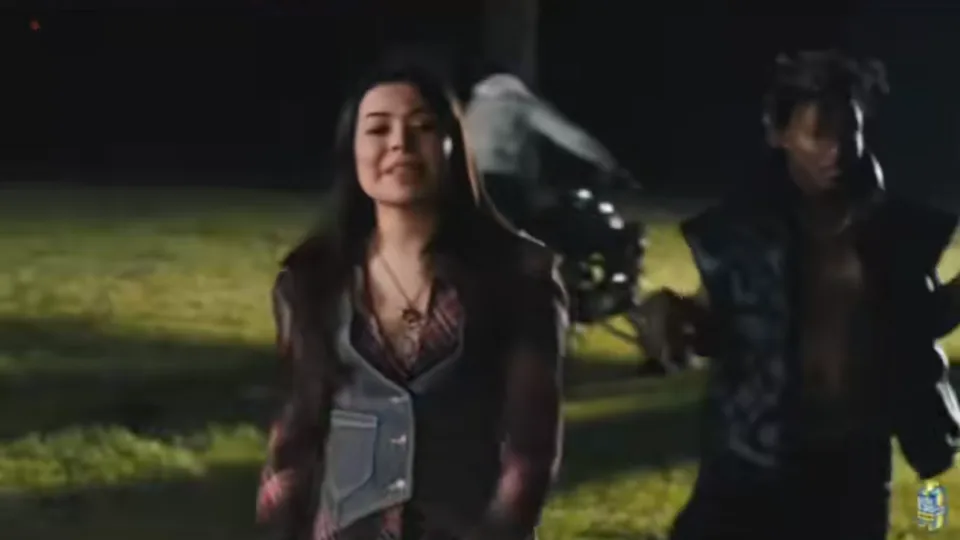
Cuts seamlessly from the floodlit night lawn and quad bike to the glowing blue studio grid and the sunlit golden tall-grass field.
Viral TikTok AI rap trend
Upload 1 or 2 photos of you and a friend (or one group photo) to star in the 15-second 16:9 Bandit music-video trend with the original song synced, from $9.99 for your first video, with a free 2-second watermarked preview per Google account. Photos deleted after 7 days and never used to train AI. 7 credits at 480p.
Your photo
One clear photo per person, facing the camera, waist-up or full-body, or one group photo of both of you. Photo 1 leads every rap close-up (night lawn, blue studio and tall grass), photo 2 hypes beside you; the song comes with it.
Effect
Video
Try it free first, one per account. The full 15-second video is 7 credits at 480p. View pricing
Answer first
Updated : new page.
The Bandit AI trend puts one or two real people from ordinary photos directly into the most recognizable 15-second sequence of Juice WRLD and YoungBoy Never Broke Again’s 2019 hit "Bandit": rapping on a headlight-lit night lawn with a quad bike behind them, cutting to the glowing blue studio grid, popping an ATV wheelie and closing in a field of tall golden grass.
The AI wave blew up on TikTok in mid-November 2026 after sitcom-character parodies like @novarunee’s viral Bandit AI edit racked up millions of views under #banditjuicewrld, followed by high-view tutorials such as @sara_lousa’s walkthrough. On RapVideo.ai, Wan 3.0 re-shoots the full 15-second 16:9 sequence with your own faces, hair and outfits while syncing the original track.
RapVideo.ai has no connection to Juice WRLD, Grade A Productions, YoungBoy Never Broke Again, Lyrical Lemonade, Cole Bennett, @novarunee, TikTok or CapCut.
Photo 1 takes the lead rapper role in every front-and-center lip-sync shot (night lawn front, blue studio close-ups, tall golden grass and closing shot). Photo 2 takes the hype partner standing alongside you on the night lawn and in the wide blue-studio shot. One photo works too if you only want to swap the lead rapper.
Yes. Switch to One group photo and upload a single clear picture of two friends side by side. The editor splits out each person’s portrait and assigns left to the lead rapper and right to the partner.
Yes. The finished 15-second 16:9 MP4 downloads with the original 15-second verse laid over it, timed to the scene cuts. Read the full tutorial: how to do the Bandit Juice WRLD AI trend.
Three steps
The video model estimates about 5 to 15 minutes. Save your MP4 with the song already synced and post it to TikTok, Reels or Shorts with an AI label.
After rendering
Inside the clip
Cuts seamlessly from the floodlit night lawn and quad bike to the glowing blue studio grid and the sunlit golden tall-grass field.
Upload 2 separate photos, 1 group photo of two friends, or 1 solo photo to take over the main verse while keeping the hype energy.
Wan 3.0 gets the original verse with the clip and is asked to match Photo 1’s mouth to it in the blue-studio and golden-grass close-ups. We have not rendered this effect ourselves yet, so check your face and mouth in the free 2-second preview first.
Check both faces free for 2 seconds at 480p before spending 7 credits on the full 15-second MP4.
We logged every scene change in the 15-second 16:9 clip. Your video keeps the backlit night lawn, blue studio grid, quad-bike wheelie cutaway, golden tall grass and the verse timing, with your photos in place of both rappers:
| Seconds | What happens |
|---|---|
| 0 to 3.5 | Backlit night lawn under dark trees with a green ATV rolling behind: Photo 1 steps up rapping to the lens as Photo 2 walks in on the right hyping on the beat (about 1.4 to 3.4 s is the 2-second preview). |
| 3.5 to 5.9 | Blue backlit vertical-bar studio in one move: the camera pushes in on Photo 1 rapping, Photo 2 leans in from behind on the left, then it widens to the two of them side by side. |
| 5.9 to 6.9 | Sketch-style transition: the two figures standing side by side turn into line drawings. |
| 6.9 to 8.7 | Night wheelie cutaway on the green quad bike: Photo 1 rides up front with both legs kicked up while the driver in the white hoodie stays as in the original. |
| 8.7 to 11.0 | Back to the night lawn medium close-up: Photo 1 raps on the right with hand gestures while Photo 2 bounces behind on the left. |
| 11.0 to 13.8 | Golden tall-grass field: slow push-in close-up of Photo 1 rapping straight into the camera. |
| 13.8 to 15.0 | Final close-up in the blue-lit studio delivering the closing line. |
| This clip | |
|---|---|
| Photos needed | 1 or 2 clear front-facing photos (or 1 group photo of two people) |
| Length & ratio | 15 seconds, 16:9 widescreen music-video frame |
| Price | 15 seconds for 7 credits at 480p, 12 at 720p or 24 at 1080p on Wan 3.0 (one-time credit packs from $9.99, no subscription) |
| Free preview | One free 2-second watermarked preview at 480p per Google account, on the site only |
| Kept from your photos | Both performers’ faces, hairstyles, builds and clothes, plus only accessories shown in the photos |
| From the clip | The backlit night lawn, blue vertical-bar studio, night quad-bike wheelie, golden tall-grass field, camera motion and synced track |
| Not from the clip | The original rappers’ faces, racing jacket, dark leather vest and corner watermark stay out of your render |
| Sound | The 15-second synced rap verse baked into the MP4 |
| Your photos | Deleted 7 days after rendering, never used to train AI |
| Tested | Not yet rendered by us with our own paid test. The preview clip at the top is @novarunee’s credited TikTok AI remake; try the free 2-second watermarked preview at 480p before spending credits. |
More rap music-video AI trends on RapVideo.ai: Hotel Lobby AI, No Scrubs AI, Tiny Desk AI, Gangsta’s Paradise AI, BigXthaPlug Give It All AI or all 61 AI video effects.
Showreel
Clips by other creators and tools, credited under each video, so you can see the format first.
Open Bandit AI on RapVideo.ai, upload 2 clear front-facing photos (or switch to One group photo for a picture of both of you), test the free 2-second watermarked preview at 480p or render the full 15-second 16:9 MP4, then download it with the song synced.
RapVideo.ai runs right in Safari or Chrome on iPhone, Android, Mac and PC. Upload 1 or 2 photos to generate the full 15-second night-lawn, blue-studio and tall-grass Bandit sequence on Wan 3.0 with synced audio.
Yes. Every Google account gets one free 2-second watermarked preview at 480p on RapVideo.ai covering the backlit night-lawn shot with both performers. The full 15-second unwatermarked MP4 costs 7 credits at 480p, with packs starting at 10 credits for $9.99.
Yes. Upload 1 photo to replace the lead rapper in every front-facing rap close-up across the night lawn, blue studio and golden tall-grass field while keeping the clip’s hype energy.
Our Wan 3.0 prompt locks each subject’s real face, hairstyle, build and outfit from the uploaded photos so the swap looks genuinely like you and your friend rather than a floating face paste.
15 seconds for 7 credits at 480p, 12 at 720p or 24 at 1080p on Wan 3.0. One-time credit packs start at 10 credits for $9.99, credits never expire, and failed renders refund automatically.
Rap duo classic
15 seconds in 16:9 widescreen, song synced, from 7 credits, with a free 2-second preview.