How to Make a Photo Sing With AI, Birthday Songs Too
To make a photo sing, an AI video model needs a clear photo with the face toward the camera and a song to sing. The song comes one of two ways: you bring a recording and the face lip-syncs it, or the AI writes and sings a new song from a line you type, such as a name and a birthday. The model then animates the face, mouth and body to that voice.
Updated
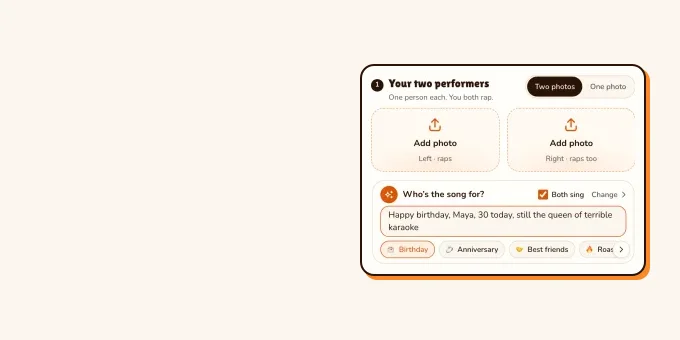
Photo to song
Make a photo sing
Lip sync, or a new song.
- Two photos
- One line
- An original song
On RapVideo both routes are made for two people: a photo of each, or one photo of you both. An original birthday, love or Christmas song costs 10 credits for 12 seconds at 720p; lip-syncing your own recording runs on Wan 3.0 in the Hotel Lobby booth, from 3 credits.
Make two photos sing a birthday song
- Add a photo of you and one of the birthday person in the editor below, or one photo of you both. Faces front-on and well lit.
- Write one line in the box: their name, their age and one memory, for example "Maya turns 30, still dances on every table". The Birthday Song stage is already selected.
- Leave Both sing on and the two of you take turns and join on the chorus; untick it and one sings while the other sways and claps.
- Make the video and download the MP4. 10 credits for 12 seconds at 720p; a failed render gives its credits back.
The song is new every time: no existing song, lyrics or famous voice is used, and the classic Happy Birthday melody is not copied. We have not published a sung result of our own yet, so this page shows none. Love and Christmas songs work the same way; more ideas for the box are on the personalized birthday song page.
Two photos, one line
Make your photos sing a birthday song
Add two photos, or one of you both, and type their name and a memory. 10 credits for 12 seconds at 720p.
Your two performers
One person each. You both sing.
Stage
Video & sound
This video: 10 credits. Ready in about 2 to 5 minutes; failed generations return your credits. View pricing
Two ways a photo can sing
| Route | You bring | Good for | Watch out for |
|---|---|---|---|
| Lip sync to a recording | A photo and the audio | Your own song, a voice note, a toast | Clean vocals sync better than a busy mix; use audio you have the rights to |
| AI writes and sings | A photo and one line of text | Birthdays, anniversaries, a holiday card | You do not choose the melody; each render is a new song |
| Song from a picture (no singing face) | A photo | A soundtrack inspired by the picture | The photo itself does not move or sing |
The viral singing photos on TikTok are mostly the first two kinds. This AI baby singing Happy Birthday passed 1.2 million views; the creator does not say which tool made it. The second clip is the third kind: Suno’s own account showing how its Scenes feature writes a song from a video or picture.
- TikTokAn AI baby sings Happy Birthday@carin0ai
- TikTokSuno Scenes writes a song from a video@sunomusic
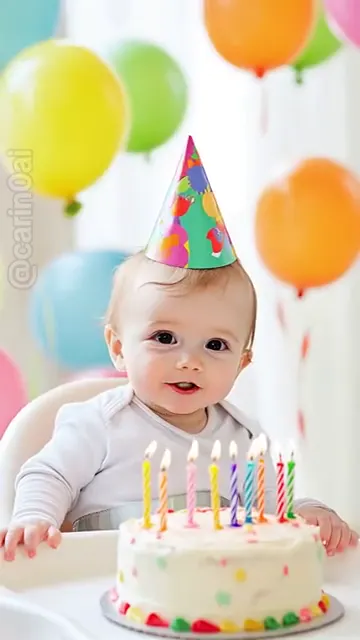
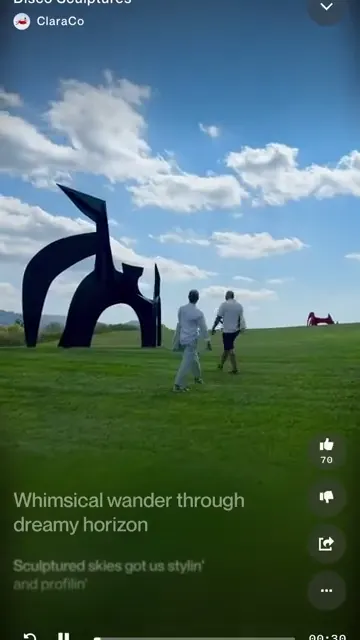
From TikTok, credited to the creators. Hover over a clip (or tap it) to play; tap a name to see the post.
Make a photo lip-sync your own recording
Have a song or a voice note already? In the Hotel Lobby AI with your own song setup, upload MP3, WAV, M4A, AAC or OGG, pick the 2 to 15 seconds you want, and the person in the left photo performs it at the booth’s hanging mic while the right one hypes. It runs on Wan 3.0, and the audio never changes the price: 12 seconds at 480p is 6 credits. The finished soundtrack is generated from your recording, so it follows it closely without being a bit-for-bit copy.
Photo tips for a singing face
- Face toward the camera with the mouth fully visible: no hand, mic or mask over it.
- Even light, no sunglasses, no heavy beauty filter. The model reads the face from what it can see.
- One person per photo when you use two photos; for one photo of you both, keep both faces about the same size.
- Use photos of people who said yes. TikTok, for one, does not allow AI videos that use a private person’s likeness without consent.
More examples of photos that work and fail are in best photos for AI rap videos.
FAQ
How do I make a photo sing with AI?
Give an AI video model a clear, front-facing photo and a song: either a recording for the face to lip-sync, or a line of text from which the AI writes and sings a new song.
How do I make a photo sing Happy Birthday?
On RapVideo, add two photos (or one of you both) to the Birthday Song stage and type the name and a memory. The AI writes an original birthday song and the two of you sing it, 10 credits for 12 seconds at 720p. It does not copy the classic Happy Birthday melody.
Can one photo of one person sing on RapVideo?
Not yet: the singing and rap videos are made for two people, from a photo of each or one photo of you both.
Can I make a photo sing my own song?
Yes. Upload MP3, WAV, M4A, AAC or OGG in the Hotel Lobby booth on Wan 3.0; the left person lip-syncs 2 to 15 seconds of it.
Is there a free way to make a photo sing?
The only free part of RapVideo is one 2-second watermarked preview per Google account, of the default Hotel Lobby video or the Bulin 47 Freestyle; everything else is paid with credits.
Can I make a pet photo sing?
We have not tested the singing stages with pets, so we cannot promise it. Front-facing pet photos with a visible mouth have the best chance in any tool.
Sources
Read next
How to Make an AI Music Video for Your Own Song
How to make an AI music video for your own song: the multi-tool workflow for a full-length video (song, scenes, lip sync, edit), or a 2 to 15-second performance clip of you and a friend on RapVideo with no extra credits for the audio.
Best Photos for AI Rap Videos: What Works, What Fails
What makes a photo work or fail in the rap video generator, from the hard limits to light, angle, framing, sunglasses and group shots, with a fix for each.
RapVideo is an independent tool, not affiliated with Quavo, Takeoff, Migos, Quality Control Music, Motown or COLORS.