How to Do the AI Dunk Trend: Make a Video of You Dunking
To do the AI dunk trend, you need one clear, full-body photo of yourself and an AI dunk template: the video model puts you on a packed pro court, dribbling in, taking off and slamming the ball home with one hand. On TikTok people use a CapCut template they call the epic dunk; on RapVideo the same move comes from one photo in the browser, with the sound on the clip. RapVideo.ai has no connection to CapCut, TikTok, the template’s makers or any league or team. The template’s dunk lasts about 6 seconds, and you never touch a ball.
Updated
AI dunk trend
One photo, one dunk
In the browser or CapCut.
- The steps
- The photo
- Posting
Below: both ways step by step, which photo works best, why some AI dunk results look off, and how to post yours (6 seconds for 4 credits at 480p, 6 at 720p or 12 at 1080p on RapVideo).
AI dunk trend: make a video of you dunking, step by step
- Pick one photo of you: full-body, facing the camera, your face clear and nothing in front of it.
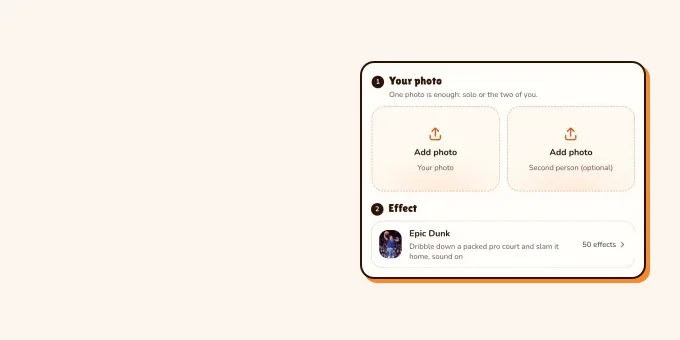
- Open the AI dunk video page on RapVideo; the editor opens on the Epic Dunk effect.
- Add your photo. The video model keeps your face, hair, clothes and shoes from it.
- Pick 480p, 720p or 1080p and press Make the effect.
- Wait for the render (the video model estimates about 5 to 15 minutes), then download the 6-second MP4 with the sound on it.
- Post it, labelled as AI.
- TikTokThe epic dunk template result our AI dunk effect follows, move for move.@yyyss7575
- TikTokAn ordinary creator’s own AI dunk: “told my high school coach I would dunk one day”.@mrchrisguillory
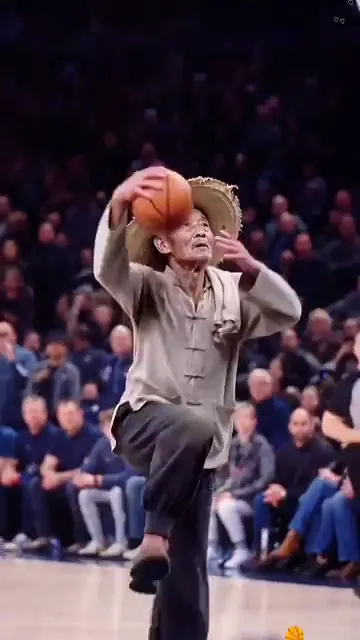
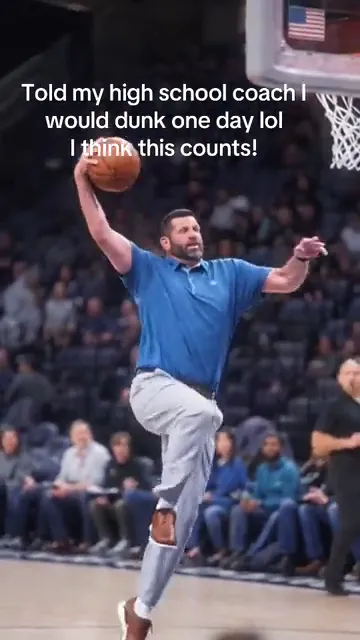
From TikTok, credited to the creators. Hover over a clip (or tap it) to play; tap a name to see the post.
One photo
Your AI dunk trend video from a photo
6 seconds from the drive to the slam, sound on, from 4 credits.
Your photo
One clear photo of you, facing the camera, full-body if you have it. You dribble down a packed pro court and dunk with one hand, in your own clothes; the sound comes with it.
Effect
Video
This video: 4 credits. Ready in about 5 to 15 minutes; failed generations return your credits. View pricing
Two ways to do the AI dunk trend
The AI dunk trend started on TikTok with CapCut templates, and people do it two ways:
| Way | What you do | What you get |
|---|---|---|
| A CapCut template | Open a template from a TikTok post and add one photo in the app | The template’s dunk, about 6 seconds |
| An AI dunk effect in the browser | Add one photo on a site such as RapVideo | 6 seconds with the sound, 4 credits at 480p |
Whichever way you pick, every AI dunk trend video starts the same way: one clear photo. The steps above are the browser way; the CapCut way is next.
The CapCut way: the epic dunk template
Most AI dunk trend posts on TikTok are tutorials for a CapCut template, and they carry a “CapCut · Try this template” link. The steps they show, in the order they show them:
- Open a post with the template link and tap the share arrow to copy the link, or tap the template link itself.
- CapCut opens on the dunk template (in the tutorials we watched its screen reads Basketball Dunk); tap Use template.
- Pick one photo of you from your gallery.
- Wait a few seconds while CapCut makes the AI dunk, then export and post it.
CapCut needs the app, and the template you get depends on the post you open. RapVideo does the same AI dunk trend move in the browser from one photo, with the sound on it: 6 seconds for 4 credits at 480p, 6 at 720p or 12 at 1080p.
Which photo works best for an AI dunk
| Photo | What happens in the AI dunk |
|---|---|
| Full-body, facing the camera | Best: your face, clothes and shoes are all there to keep |
| Waist-up | Not tested for this effect: the model first draws the rest of you, so your legs and shoes are its guess |
| T-shirt and jeans | What we tested: both stayed the whole way |
| Hoodie, jersey, coat or dress | Not tested yet |
| Short top | Can ride up at the top of the jump, as in our test |
| Hat or sunglasses | The effect is told to draw what your photo shows, so leave them off if you do not want them |
| Group photo | Crop it to you first: the effect has one person on the court |
We tested it once on 6 November 2026 at 480p, with a full-body photo of an AI-made young man in a T-shirt and jeans: he hit every beat of the dunk in his own clothes, and nothing of the old man in the template, not the straw hat, the towel or the jacket, showed up.
Why your AI dunk video looks off
- The face is small or turned away in the photo: the dunk ends close up, looking up at you, so the face needs to be clear.
- The photo is a selfie with one arm out: the model has to guess your other arm and your body.
- Something covers you: a bag, a pet or another person in front of you can end up in the clip.
- Writing on clothes can come out garbled, as the lettering on a background player’s jersey did in our test; a plain top is safer.
- You used someone else’s photo: use your own, or a friend who said yes. Famous faces and children are not for this.
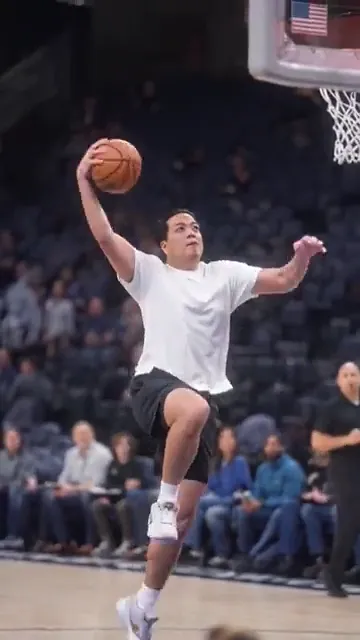
From TikTok, credited to the creators. Hover over a clip (or tap it) to play; tap a name to see the post.
Tips for posting your AI dunk
- Tag it: on 6 November 2026 #epicdunk had 664 videos and 3 million views, and #aidunk 949 videos.
- Give it a story, like the creator who told his high school coach he would dunk one day.
- Turn on TikTok’s AI-generated content label. The rules are in does TikTok allow AI videos?.
- Make one for a friend or a grandparent who said yes: the less likely the dunker, the better the post.
- Post it soon: 41 of the 66 epic dunk posts we sampled on 6 November 2026 were from the previous 24 hours, so the AI dunk trend was still busy that week.
What the epic dunk template is and why it is everywhere: the epic dunk meme.
FAQ
How do you do the AI dunk trend?
Take one clear, full-body photo of yourself and run it through an AI dunk template: the CapCut epic dunk template on your phone, or the AI dunk video effect on RapVideo.ai in the browser.
How do I make an AI video of me dunking?
Add one photo of you to an AI dunk template. On RapVideo.ai the Epic Dunk effect turns it into a 6-second video of you dribbling down a pro court and dunking, with the sound, from 4 credits.
Which app do people use for AI dunk trend videos?
Most AI dunk trend posts on TikTok use a CapCut template. RapVideo.ai makes the same kind of AI dunk in the browser from one photo, no app needed.
Do I need to know how to play basketball?
No. The dribble, the jump and the dunk come from the template; only your face, hair and clothes come from your photo.
Will people know my AI dunk is AI?
Often, yes: every epic dunk has the same arena, crowd and camera. Label it as AI anyway; TikTok asks creators to label realistic AI-generated content.
How long is an AI dunk trend video?
The epic dunk template result runs about 6 seconds, from the first dribble to the slam. TikTok posts are longer because they add a tutorial.
Are AI dunk trend videos free?
Not on RapVideo.ai: the AI dunk costs 4 credits at 480p, and there is no free version of this effect. CapCut sets its own terms for its templates.
Sources
Read next
Epic Dunk Meme: The CapCut Trend Where Anyone Dunks
The epic dunk meme: a CapCut template that puts anyone, grandmas, farmers, TV characters, on a packed pro court for a slow-motion slam. What the epic dunk is, where the template came from, why it is funny, how to tell real dunks from AI ones, and how to make your own epic dunk from one photo (6 seconds, from 4 credits).
Does TikTok Allow AI Videos? Labels and Rules for 2026
TikTok allows AI videos but requires a label on realistic AI people and scenes: the label steps on phone and computer, what stays banned (private people without consent, misleading public figures), auto labels, and reach.
How to Make Funny AI Videos of Your Friends
How to make funny AI videos of your friends from two photos or one: rap duos, roast battles, hugs and one-photo trends, with ten ideas, the steps, what each costs on RapVideo and why to get a yes before posting.
RapVideo is an independent tool, not affiliated with Quavo, Takeoff, Migos, Quality Control Music, Motown or COLORS.