How to Do the Window Peeper Trend (CapCut or One Photo)
The window peeper trend is a 14-second TikTok video filmed as if from outside an apartment block at night: the camera creeps toward one lit window, the person inside is eating a burger, freezes mid-bite, stares straight into the lens and then pulls the curtain shut. To do the window peeper trend you need one photo of yourself and one of two tools: a CapCut template, which puts your face into fixed window footage, or an AI video effect, which renders a new clip of you.
Updated
TikTok window trend
Window peeper, 2 ways
One photo is the fastest.
- One photo
- CapCut
- Four foods
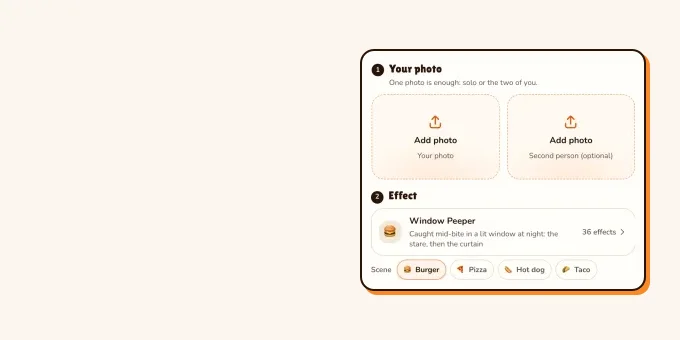
On RapVideo the window peeper trend takes three taps: add the photo, keep Window Peeper selected (burger, pizza, hot dog or taco) and make the effect. You get a 14-second vertical MP4 with the trend sound on it, for 7 credits at 480p. Both routes are below, with what the trend copies second by second and how to post it.
What is the window peeper trend?
The window peeper trend started on TikTok on 20 October 2026. The post that spread it, by @therealrodentspawn, is a CapCut template tagged #mrbean with the caption "Try this filter yourself"; it had about 1.2 million plays when we checked on 22 October. Within a day the same 14 seconds came back with other faces under #windowpeeper, plus a wave of tutorials. Who made the very first version is not confirmed.
People also call the window peeper trend a window peeper filter, a window peeper effect or a window view filter; Spanish captions say "efecto mirón de ventana". It is a staged joke: the camera plays the peeper, and the person in the window is whoever made the clip. Searching "window peeper" on Google mostly shows Halloween window props, which have nothing to do with the trend.
| When | What happened |
|---|---|
| 20 Oct 2026 | @therealrodentspawn posts the 14-second window clip as a CapCut template |
| 21 Oct 2026 | Remixes with other faces and CapCut tutorials spread under #windowpeeper and #windowpeeperfilter |
| 22 Oct 2026 | The first post passes about 1.2 million plays; Google still shows no suggestions for the trend |
One photo
Make your window peeper video
Add one clear photo; Window Peeper is already selected. 14 seconds from 7 credits, trend sound on the clip.
Your photo
One clear photo of you, facing the camera, waist-up if you have it. You sit at the window, stare and pull the curtain; the room and the trend sound come with it.
Effect
Video
This video: 7 credits. Ready in about 5 to 15 minutes; failed generations return your credits. View pricing
Window peeper trend from one photo, step by step
- Pick one sharp, front-facing photo of one person, waist-up or full-length. The stare is almost half the clip, so clear eyes matter most, and you stand up to close the window at the end, so your outfit shows.
- Add it in the editor below. Window Peeper is already selected with the burger, 14 seconds in 9:16. Tap Pizza, Hot dog or Taco if you want another food; the window, the stare and the curtain stay the same.
- Make the effect. The video model estimates about 5 to 15 minutes; the price shows on the button before you start, and a failed render gives its credits back.
- Download the MP4. The trend sound is already on it, so it is ready to post.
Price: 7 credits at 480p, 12 at 720p or 24 at 1080p, the same for every food. This effect has no free preview. The only free part of RapVideo is one 2-second watermarked preview per Google account, of the default Hotel Lobby video or the Bulin 47 Freestyle; everything else is paid with credits. More about the effect: window peeper filter.
Window peeper trend in CapCut: the template route
The TikTok tutorials for the trend (one, two) all follow the same CapCut route. We have not tested these templates; this is what the tutorials showed on 21 October 2026:
- Open a window peeper post on TikTok that shows "CapCut · Try this template" above the caption.
- Tap it, then tap "Use template in CapCut". If the bar is missing, the tutorials copy the post link from the share arrow, or open the template from the creator’s profile.
- CapCut opens the template. Pick one photo of you.
- Tap Next, wait while CapCut builds the clip, then export it and post.
A CapCut template keeps its creator’s footage: the window, the room, the food, the clothes and the length are fixed, and only the face changes. Templates also get re-uploaded under new names, so check what a template actually makes before you use it.
CapCut template or AI video: which window peeper trend route?
| CapCut template | RapVideo effect | |
|---|---|---|
| You add | One photo, in the CapCut app | One photo, in the browser |
| Window and room | The template’s own window and room | A new lit window and room, made around you |
| What changes | Your face goes into the template footage | A new 14-second clip is rendered around you |
| Clothes | The template’s | The outfit in your photo |
| Food | Whatever the template has | Burger, pizza, hot dog or taco |
| Sound | The template’s sound | The trend sound, added to the clip |
| Cost | CapCut’s own terms | 7 credits at 480p, 12 at 720p or 24 at 1080p |
What every window peeper trend video copies, second by second
Every window peeper video keeps the same beats. We timed them on the remix our effect follows:
- 0 to 1.5 seconds: night, a dark apartment block, and the camera pushing in on the one lit window.
- 1.5 to 5 seconds: close on the window. You take a big bite, then look up with your mouth full.
- 5 to 10.5 seconds: the stare. You chew slowly and look straight into the lens, no smile, no blink.
- 10.5 to 13 seconds: you put the food down, stand up and pull the curtain across the window.
- 13 to 14 seconds: the curtain covers the window.
These remixes went around on TikTok with ordinary faces at the window. Most others use famous ones, which is not what this is for. Hover over one (or tap it) to play.
- TikTokCaught mid-bite, then the curtain@vkiutrinh5179
- TikTokThe red-haired stare@vkiutrinh5179
- TikTokA yellow jersey at the window@ninezincreates1.ai
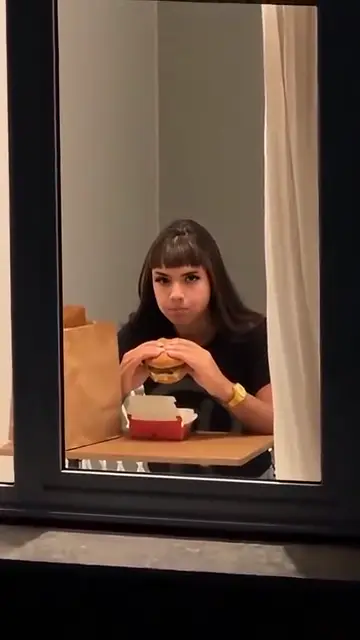
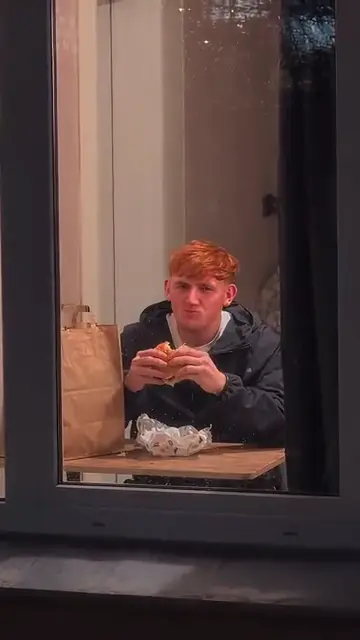
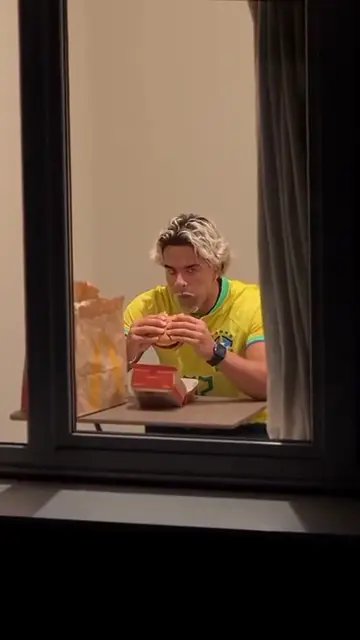
From TikTok, credited to the creators. Hover over a clip (or tap it) to play; tap a name to see the post.
Why window peeper trend videos work
A lit window in a dark building is a picture anyone reads with the sound off, and the push-in tells you where to look before the first bite. The joke needs no words and no dance: one face at one window, chewing and staring for a few seconds too long. Then the curtain closes the window on a clean cut, and the clip loops straight back to the night outside.
Posting your window peeper trend video
- Turn on TikTok’s AI-generated content label before you post: TikTok asks creators to label realistic AI videos of people. The rules are in does TikTok allow AI videos?.
- The trend sound is already on our MP4. To use the sound from TikTok’s library instead, pick it in the sound picker and turn the clip’s own sound down.
- Use your own photo, or a friend’s with a yes, and keep it a staged joke. Never film into a real window.
Photo tips for any one-photo trend are in best photos for AI rap videos. Other trends that work the same way: Bulin 47 AI and Burning Bridges AI (written up in how to do the Burning Bridges trend).
FAQ
What is the window peeper trend?
A TikTok trend from October 2026: a 14-second video shot as if from outside a building at night, where the person in a lit window freezes mid-bite, stares into the camera and pulls the curtain shut.
How do I do the window peeper trend without CapCut?
Add one clear photo on RapVideo.ai, keep Window Peeper selected, pick the food and make the effect. The 14-second MP4 comes with the trend sound on it.
Is there a window peeper filter on TikTok?
Not an official camera filter. The clips come from user-made CapCut templates of the window clip, which is why the captions say "Try this filter yourself".
Who started the window peeper trend?
The post that spread it was published on 20 October 2026 by @therealrodentspawn as a CapCut template. Who made the very first version is not confirmed.
How much does a window peeper video cost?
7 credits at 480p, 12 at 720p or 24 at 1080p on RapVideo.ai, 14 seconds in 9:16. The smallest pack is 10 credits for $9.99, and a failed render gives its credits back.
Can two people be in one window peeper video?
Not on RapVideo.ai: the window has one person at the table. Make one clip each and post them side by side.
Sources
Read next
Does TikTok Allow AI Videos? Labels and Rules for 2026
TikTok allows AI videos but requires a label on realistic AI people and scenes: the label steps on phone and computer, what stays banned (private people without consent, misleading public figures), auto labels, and reach.
Best Photos for AI Rap Videos: What Works, What Fails
What makes a photo work or fail in the rap video generator, from the hard limits to light, angle, framing, sunglasses and group shots, with a fix for each.
How to Do the Burning Bridges Trend With AI (3 Ways)
How to do the Burning Bridges AI trend from Drake’s party scene: one photo on RapVideo (15 seconds for 7 credits at 480p or 12 at 720p, song on the clip), a CapCut template, or a prompt in a video model, with photo and posting tips.
RapVideo is an independent tool, not affiliated with Quavo, Takeoff, Migos, Quality Control Music, Motown or COLORS.