Camcorder texture
Grain, warm faded color, soft focus and darkened corners: it looks like a tape from a shoebox.
Throwback effect
Ever wondered what you would have looked like in the 80s? Here it is as a moving clip: your photo (or one per person) turns into a grainy 1985 home video shot on a VHS camcorder, with big hair, a neon windbreaker or a denim jacket, and a sunny backyard where you wave and dance. 5 seconds at 720p for 4 credits.
Your photo
One photo is enough: solo or the two of you.
Effect
Video
This video: 4 credits. Ready in about 2 to 5 minutes; failed generations return your credits. View pricing
Answer first
Updated
Behind the 80s AI trend is one question: what would I look like in the 80s? In September 2026 Instagram filled with still answers, made by giving ChatGPT a selfie and the prompt “show me what I would have looked like around 1985”, Business Today reported. An earlier wave, in autumn 2023, used the Epik app to make ’90s yearbook portraits.
The 80s Camcorder effect turns that answer into footage. Your photo becomes a home video from 1985 on a VHS camcorder: grain, warm and slightly faded color, soft focus, a dark vignette. You show up with big 80s hair and an 80s outfit, maybe a neon windbreaker, a denim jacket or bold shoulder pads. The setting is a suburban backyard in full sun, an old car parked in the driveway. You wave at the camcorder, laugh, do a little dance and lean toward the lens.
Only your face is carried over from the photo; the rest is invented for the decade. The soundtrack is an original 80s synth-pop tune, slightly muffled as if played from tape, with no vocals.
No. The prompt forbids captions and on-screen text, so you get the camcorder look without a date stamp, a REC light or a year in the corner. If you want “1985” on it, type it in TikTok, Instagram or CapCut as a text layer.
Three steps
Any clear, recent picture, face to the camera. Two people? Add one photo each, or one with both of you.
Effects → Photos
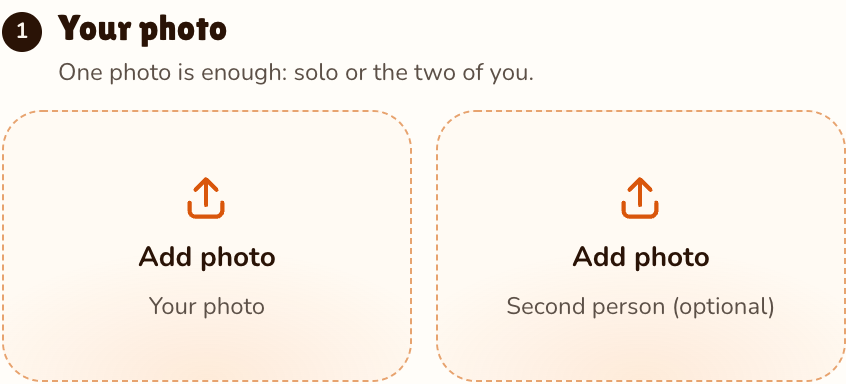
RapVideo editor · View full screenshot ↗
It is preselected; 28 effects shows the rest.
Effects → 80s Camcorder
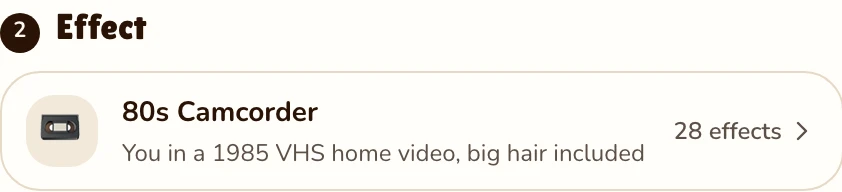
RapVideo editor · View full screenshot ↗
The provider estimates up to about 5 minutes. The MP4 can be vertical, square or widescreen; choose before you render.
After rendering
Inside the clip
Grain, warm faded color, soft focus and darkened corners: it looks like a tape from a shoebox.
Big hair and 80s clothes invented around your real face: neon windbreaker, denim jacket, shoulder pads.
A sunny suburban lawn, a backyard with a vintage car in the driveway, and you waving, laughing and dancing a little.
An upbeat original 80s synth-pop tune, a bit muffled like old tape, with no vocals and no borrowed song.
| This clip | |
|---|---|
| Photos | Add a photo of you, or one of each person for two (same price) |
| Price | 4 credits for 5 s at 720p; 5, 8, 10, 12 or 15 s possible |
| Kept from your photo | Your face only |
| Made by the effect | 80s hair and clothes, the sunny backyard, the VHS camcorder look |
| Sound | An original 80s synth-pop tune, a little muffled, no voices |
Got real old photos from the 80s or before? Animate old photos brings the actual picture to life without restyling it. To drop yourself into other scenes, try AI video of yourself; to meet the kid you used to be, hug your younger self. This month’s other trends are the Raindance AI trend and the AI Halloween costume; everything else is under AI video effects.
Watch
Videos and posts from creators and other tools, each credited and linked to the original. Nothing loads from YouTube until you press play.
Using AI to see how you might look in the 1980s: teased hair, neon, denim, faded film. The 80s AI trend began with still photos; this page turns it into a short 80s home video shot on a VHS camcorder in 1985.
Add a clear photo, leave 80s Camcorder selected and press Make the effect. A few minutes later you are in a sunny backyard with big hair and an 80s outfit, waving at the camcorder.
That is the setting: what you would have looked like in the 80s, as a home video filmed in 1985. The face comes from your photo; everything around it is invented.
Yes. Add a photo of each person, or one photo with both of you; that puts the two of you in one 80s home video, for 4 credits.
Close to it, but rendered rather than live: the 80s Camcorder effect turns one photo into a moving clip with a VHS look and an original 80s synth-pop tune. It runs in your browser, with nothing to install.
No on-screen text at all. Add a date in your app when you post.
The 80s Camcorder effect expects a recent photo and swaps hair and clothes. To animate real old photos as they are, use the Bring to Life effect instead.
5 seconds at 720p for 4 credits on Seedance 2.0 Mini. Longer or sharper clips cost more, and the price shows before you render. No free trial: packs start at 10 credits for $9.99, and a failed render gives its credits back.
Guides
Press play on 1985
5 seconds, 4 credits. Big hair included.
