How to Do the Outstanding AI Trend (Tiny Desk AI Video)
The Outstanding AI trend is the TikTok name for Tiny Desk AI videos: AI remakes of a small office concert where a band packed in front of a bookshelf plays "Outstanding". To do the Outstanding AI trend, you put your own people in that band: one sings at a red keyboard, one cracks up laughing at the camera, one plays the sax solo, and up to two sing behind.
Updated
Outstanding AI trend
Your band, 1 to 5
No Kling needed.
- Band size
- Photos
- Song on it
On RapVideo the Outstanding AI trend takes three steps: pick how many people play, add a photo of each (or one group photo), and make the effect. You get a 15-second vertical MP4 with "Outstanding" on it, for 7 credits at 480p, and you need no Kling, CapCut or template link. Every step of the Outstanding AI video is below, with the shots, the parts and the other routes creators use.
What is the Outstanding AI trend?
The Outstanding AI trend started on TikTok on 18 October 2026 with a post that cast that week’s losing college football coaches as a Tiny Desk band. It had 2.8 million plays by 28 October. Creators then put athletes, families, friends and TV casts in the same band, always to the same song.
The joke comes from Charlie Wilson’s NPR Tiny Desk Concert, published on 5 June 2023, whose set ends with "Outstanding", the 1982 Gap Band hit he sang lead on. So the trend goes by several names. On 30 October 2026 TikTok search showed tutorials captioned "outstanding tiny desk set", "tiny desk concert outstanding ai tutorial" and "mini outstanding tiny desk", with tags such as #tinydeskconcertai. They are all the same Outstanding AI trend.
| Name you will see | What it means |
|---|---|
| Outstanding AI trend | The trend, named after the song in it |
| Outstanding Tiny Desk set | Charlie Wilson’s NPR set, or a remake of its last song |
| Tiny Desk concert AI | An AI remake of that concert clip with new faces |
| Tiny Desk AI | The same videos; our effect page uses this name |
Up to five people
Make your Outstanding AI video
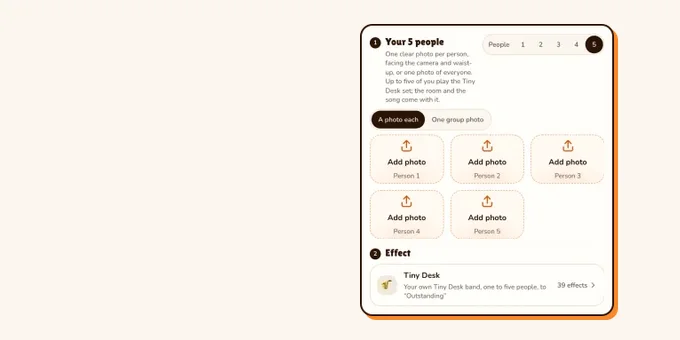
Pick your band size and add a photo of each; the effect is already selected. 15 seconds from 7 credits, song on the clip.
Your photo
One clear photo per person, facing the camera and waist-up, or one photo of everyone. Up to five of you play the Tiny Desk set; the room and the song come with it.
Effect
Video
This video: 7 credits. Ready in about 5 to 15 minutes; failed generations return your credits. View pricing
How to make the Outstanding AI video from your photos
- Pick your band size, 1 to 5 people. Add a clear photo of each person, waist-up and facing the camera, or switch to one group photo of all of you.
- Put the funniest face first. Photo 1 gets the laughing close-up, the longest shot in the Outstanding AI video.
- Keep the Tiny Desk effect selected in the editor below: 15 seconds in 9:16 on Wan 3.0. Pick 480p, 720p or 1080p; the band is the same.
- Make the effect. The video model estimates about 5 to 15 minutes; the price is on the button before you start, and a failed render gives its credits back.
- Download the MP4. "Outstanding" is already on it, so your Outstanding AI trend video is ready to post.
Price: 15 seconds for 7 credits at 480p, 12 at 720p or 24 at 1080p, the same for one person or 5. In our own test render of a five-person band on 30 October 2026, all five photos took their parts in the band, the laugh and the sax solo; one T-shirt picked up a letter that was not in the photo. The only free part of RapVideo is one 2-second watermarked preview per Google account, of the default Hotel Lobby video or the Bulin 47 Freestyle; everything else is paid with credits. The effect page: Tiny Desk AI.
Who plays what in the Outstanding AI trend
Each photo plays one part, in the order you add them. With fewer than five of you, people already in the band also sing behind the lead, so the whole band is you and no stranger walks into your Outstanding AI video.
| People | The laugh | Lead singer | Sax solo | Backing singers |
|---|---|---|---|---|
| 1 | Photo 1 | Photo 1 | Photo 1 | Nobody |
| 2 | Photo 1 | Photo 2 | Photo 1 | Photo 1 on the right |
| 3 | Photo 1 | Photo 2 | Photo 3 | Photos 3 and 1 |
| 4 | Photo 1 | Photo 2 | Photo 3 | Photos 4 and 1 |
| 5 | Photo 1 | Photo 2 | Photo 3 | Photos 4 and 5 |
With one group photo, the parts go from left to right in the photo, and each person is drawn on their own before the video is made.
The Outstanding AI video, shot by shot
Every Outstanding AI trend video copies the shots of the first post. Yours starts on the first line, "Outstanding", and runs 15 seconds:
| Seconds | Shot |
|---|---|
| 0 to 5.3 | The band, tight on a cluttered bookshelf: the lead singer at a red keyboard opens with "Outstanding", two backing singers behind, everyone in headphones. |
| 5.3 to 11.6 | One person in close-up, glancing aside, then laughing at the camera. |
| 11.6 to 15 | The sax solo to the end, with the lead singer’s head in the corner of the frame. |
The Outstanding AI trend with Kling AI, CapCut or a template
Tutorials for the Outstanding AI trend take other routes. We have not tested them; this is what they showed on 30 October 2026:
- Kling AI: TikTok tutorials, among them one of the top results for "tiny desk ai tutorial", replace the characters of the clip with photos of you and your friends in Kling AI.
- CapCut: many tutorial posts are tagged #capcut and swap faces into a ready-made Outstanding template, usually one face at a time.
- A written workflow: Kapwing’s written guide makes a character sheet for each person, turns the original performance into outline clips, renders four clips with Seedance 2.5 and stitches them in a template.
| Kling AI tutorial | CapCut template | Kapwing workflow | RapVideo effect | |
|---|---|---|---|---|
| Where | The Kling AI app | The CapCut app | Kapwing | In the browser |
| People | Several, by its tutorial | Usually one face | One sheet per person | 1 to 5, each in a part |
| Clips to stitch | Depends on the tutorial | None | Four | None |
| Tested by us | No | No | No | Yes, five people |
Tips for an Outstanding AI trend video
- Waist-up photos work best: the band shots stop at the chest and the laugh is a close-up.
- With five people, separate photos keep faces sharper than one group photo, where every face is small.
- Glasses and hats stay only if they are in the photo; everyone gets the band’s black headphones.
- Your own photos, or friends who said yes. The first Outstanding AI posts used famous coaches; a real person’s face in a realistic AI video needs their agreement.
Posting your Outstanding AI trend video
- Turn on TikTok’s AI-generated content label: TikTok asks creators to label realistic AI videos of people. The rules are in does TikTok allow AI videos?.
- Our MP4 already has "Outstanding" on it. To use TikTok’s own sound instead, pick it in the sound picker and turn the clip down.
- Creators tag these videos #tinydeskconcertai and #tinydeskconcert, and caption them with the trend’s names: Outstanding AI trend or outstanding Tiny Desk set.
Want the story behind the clip, the song and the first post? Read the Outstanding Tiny Desk meme, explained. Another group trend: Dame Hombro AI, the shoulder dance for up to three.
FAQ
What is the Outstanding AI trend?
The TikTok name for Tiny Desk AI videos: AI remakes of Charlie Wilson’s NPR performance of "Outstanding", with new people in the band. The Outstanding AI trend started on 18 October 2026.
How do I do the Outstanding AI trend without Kling?
On RapVideo.ai, pick 1 to 5 people, add a photo of each or one group photo, keep the effect selected and make it. The 15-second MP4 comes with the song on it.
Is there an Outstanding Tiny Desk AI template?
Not an official one. Tutorials use templates in CapCut or Kling AI that usually swap one face. On RapVideo.ai the Outstanding AI effect works like a template for up to 5 people, each in their own part.
How many people can be in the Outstanding AI video?
One to 5. Photo 1 is the laugh, photo 2 the lead singer, photo 3 the sax, photos 4 and 5 the backing singers. With fewer people, the ones already in the band also sing behind.
What song is in the Outstanding AI trend?
"Outstanding" by The Gap Band, from 1982, as Charlie Wilson sang it at his 2023 NPR Tiny Desk Concert.
How much does an Outstanding AI trend video cost?
15 seconds for 7 credits at 480p, 12 at 720p or 24 at 1080p on RapVideo.ai, in 9:16, for any band size. The smallest pack is 10 credits for $9.99, and a failed render gives its credits back.
Sources
Read next
Outstanding Tiny Desk Meme: The Original Set and the Song
The Outstanding Tiny Desk meme explained: Charlie Wilson’s 2023 NPR Tiny Desk set, the Gap Band song, why losing teams got it, and the Tiny Desk concert AI trend it became (make yours in 15 seconds, from 7 credits).
How to Make Funny AI Videos of Your Friends
How to make funny AI videos of your friends from two photos or one: rap duos, roast battles, hugs and one-photo trends, with ten ideas, the steps, what each costs on RapVideo and why to get a yes before posting.
Does TikTok Allow AI Videos? Labels and Rules for 2026
TikTok allows AI videos but requires a label on realistic AI people and scenes: the label steps on phone and computer, what stays banned (private people without consent, misleading public figures), auto labels, and reach.
RapVideo is an independent tool, not affiliated with Quavo, Takeoff, Migos, Quality Control Music, Motown or COLORS.