How to Do the Stormzy Shut Up AI Trend From One Photo
To do the Stormzy Shut Up AI trend, you need one clear photo of yourself and a Stormzy Shut Up AI template: you get about 10 seconds of you at the front of Stormzy’s 2015 park freestyle, rapping to the camera with his crowd behind you and the original sound. On TikTok people use a CapCut template; on RapVideo.ai the same scene comes from one to three photos in the browser, so up to two friends can join you.
Updated
Stormzy Shut Up AI
One photo, the lead
In the browser or CapCut.
- The steps
- The photo
- Posting
RapVideo.ai has no connection to Stormzy, the creators below, TikTok or CapCut. Below: both ways step by step, which photo works best, why some results look off, the sound, and tips for posting (10 seconds for 5 credits at 480p, 8 at 720p or 16 at 1080p on RapVideo.ai).
Stormzy Shut Up AI from your photos, step by step
- Pick one clear photo of you, facing the camera, waist-up if you have one; add a photo of each friend who wants to be in it, up to two.
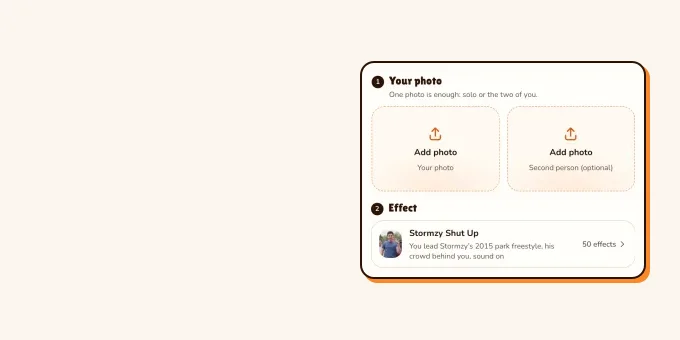
- Open the Stormzy Shut Up AI page on RapVideo.ai; the editor opens on the Stormzy Shut Up effect.
- Add your photo first: photo 1 takes the lead, photo 2 goes on the left of the frame and photo 3 on the right.
- Pick 480p, 720p or 1080p and press Make the effect.
- Wait for the render (the video model estimates about 5 to 15 minutes), then download the 10-second MP4 with the original sound on it.
- Post it, labelled as AI.
One to three photos
Make your own version from one to three photos
10 seconds at the front of the freestyle, sound on, from 5 credits.
Your photo
One clear photo per person, facing the camera, waist-up if you have it. Photo 1 leads at the front of Stormzy’s 2015 park freestyle; photos 2 and 3, if you add them, take the left and right of the frame; the original sound comes with it.
Effect
Video
This video: 5 credits. Ready in about 5 to 15 minutes; failed generations return your credits. View pricing
Stormzy Shut Up AI trend in CapCut, step by step
- Find a post with a "CapCut · Try this template" link above the caption, such as this tutorial from 10 November, or search TikTok for "stormzy shut up ai".
- Tap the template link. CapCut opens on the template: the one in most promo posts is SHUTUP - REMIX by LDtemplates, which takes one clip or photo.
- Tap Use template and pick one photo of you, or of a friend who said yes.
- Wait while CapCut makes the video: the template puts your face on the lead and keeps the crowd and the sound.
- Export it, then post it on TikTok with the AI-generated label on.
If a template link stops working, try another promo post. CapCut sets its own terms for templates and exports.
Two ways to do the Stormzy Shut Up AI trend
| Way | What you do | What you get |
|---|---|---|
| The CapCut template | Open the template from a TikTok post and add one photo in the app | About 10 seconds, the template’s sound |
| The Stormzy Shut Up effect in the browser | Add one to three photos on RapVideo.ai | 10 seconds, 16:9, the original sound, 5 credits at 480p |
Either way, the result starts with one photo for the lead, and the photo decides how good it looks.
Which photo works best for the Shut Up template
The template result shows the lead close to the camera from the chest up, turning and gesturing, so the face does most of the work:
| Photo | Why |
|---|---|
| Face clear, facing the camera, in good light | The lead is close to the lens the whole time |
| Chest up or waist up | That is the framing of the clip; full-body adds nothing here |
| One person in the photo | A group photo can confuse which face to use |
| No sunglasses or hat, unless you want them | What your photo shows is usually what the lead wears |
| Your own photo, or a friend who said yes | Faces of famous people and of children are not for this |
We tested it on 11 November 2026 with photos of AI-made people at 480p, from one photo and from three: every face, hairstyle and outfit came from the photos for all 10 seconds and every gesture landed on time, though in the three-photo version the left-hand friend stood a step back and was now and then half hidden. Two photos not tested.
Why your Shut Up template video looks off
- The face is small or turned away in the photo, so the model guesses it.
- The photo is blurry or heavily filtered.
- Two people in the photo: the template picks one face, not always the one you meant.
- Hands or a phone in front of the face can stay in the video.
- The crowd behind is always the 2015 crowd: that part is the template, not a mistake.
The sound on the Shut Up template
The template comes with its sound already on it. In our sample of 102 posts on 11 November 2026, 42 used the same template sound, listed on TikTok as an original sound by Trendingcapcutz. Keep the sound the template gives you, so your post lands on the sound’s page with the others. The song is Stormzy’s, and the trend is built on it; what it is and where it came from: what the Stormzy Shut Up AI trend is.
Do the Shut Up freestyle yourself, no AI
Plenty of creators still perform the freestyle themselves: one person in front, a few friends behind, a phone held at chest height. Learn the gestures from the original video, keep it to about 10 seconds, and film it outdoors if you can.
- TikTokPerforming the Shut Up freestyle at home, no AI.@fare.ashton
- TikTokThe freestyle at night in a park, phone in hand.@sjjbackup0
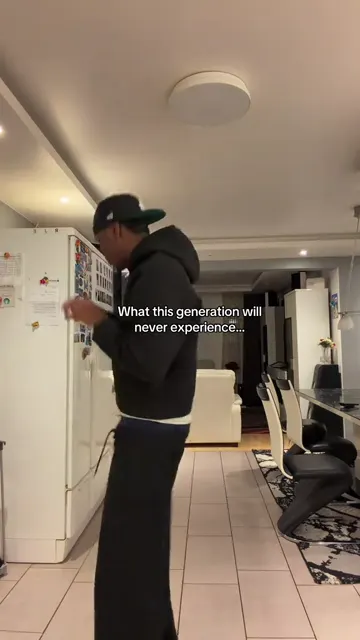
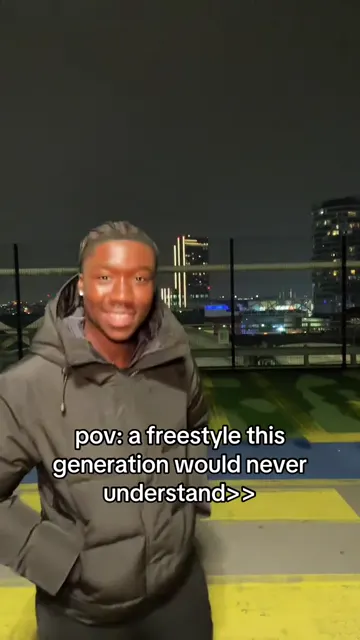
From TikTok, credited to the creators. Hover over a clip (or tap it) to play; tap a name to see the post.
Tips for posting your version
- Tag it: on 11 November 2026 #stormzyshutupai had 577 videos and 224,600 views, and #stormzyshutup 816 videos.
- Post it soon: 71 of the 102 posts we sampled that day were from the previous 24 hours.
- Put someone unexpected in the lead, a parent or a teacher who said yes: the less likely the rapper, the better the post.
- Turn on TikTok’s AI-generated content label. The rules are in does TikTok allow AI videos?.
FAQ
How do you do the Stormzy Shut Up AI trend?
Open a TikTok post with a "Try this template" link, tap it, add one clear photo in CapCut and export. You get about 10 seconds of you at the front of Stormzy’s 2015 freestyle, with the original sound.
What app is used for the Stormzy Shut Up AI trend?
Most posts use a CapCut template. Web generators made for the trend do the same from a photo in the browser.
How many photos does the Shut Up template need?
One, for the lead, in CapCut. On RapVideo.ai one to three: you in the lead and up to two friends with you.
How long is a Stormzy Shut Up AI video?
About 10 seconds of the freestyle, the same stretch the CapCut template uses, in a wide 16:9 frame.
Can I make a Stormzy Shut Up AI video without CapCut?
Yes. On RapVideo.ai the Stormzy Shut Up effect makes it in the browser from one to three photos, 10 seconds with the original sound, from 5 credits.
Can I put a celebrity in the Stormzy Shut Up AI video?
Many promo posts do, but use your own photo or a friend who said yes. Faces of famous people and of children are not for this.
Sources
Read next
What Is the Stormzy Shut Up AI Trend? Where It Came From
Stormzy Shut Up AI: the TikTok trend that puts a new face at the front of Stormzy’s 2015 Shut Up freestyle, what happens in the video, where the AI version came from, who people put in it, who the song is aimed at, and how to tell an AI version from the real one.
Does TikTok Allow AI Videos? Labels and Rules for 2026
TikTok allows AI videos but requires a label on realistic AI people and scenes: the label steps on phone and computer, what stays banned (private people without consent, misleading public figures), auto labels, and reach.
How to Make Funny AI Videos of Your Friends
How to make funny AI videos of your friends from two photos or one: rap duos, roast battles, hugs and one-photo trends, with ten ideas, the steps, what each costs on RapVideo and why to get a yes before posting.
RapVideo is an independent tool, not affiliated with Quavo, Takeoff, Migos, Quality Control Music, Motown or COLORS.