How to Bring a Kid’s Drawing to Life With AI (Free and Paid)
To bring kids drawings to life, take a flat, well-lit photo of the drawing, then choose what “alive” should mean. Animation tools move the drawing itself: the crayon lion walks and dances in its own flat lines. AI realistic tools make it real: the crayon lion becomes a real, furry lion on a real savanna, still with the box body and stick legs your child drew. That second kind is the TikTok kids drawing to life trend.
Updated
Drawing to life
From paper to real
Free and AI ways.
- The photo
- Free cartoon
- Make it real
Below: how to photograph the drawing, the free way to animate kids drawings, the AI way to bring kids drawings to life as real animals (on RapVideo, 5 seconds at 720p for 4 credits), what we saw when we tested it, and how to share the result.
Step 1: photograph the drawing
- Lay the paper flat on a plain table, near a window or under a bright lamp.
- Hold the phone straight above it, so the paper is not slanted, and fill the frame with the whole drawing.
- Avoid your own shadow, fingers on the paper and a busy background around it.
- Leave the child out of the photo: only the drawing is needed to bring kids drawings to life.
One photo of a drawing
Bring a kid’s drawing to life
5 seconds of the drawing as a real, living thing, from 4 credits.
Your drawing
One photo of the drawing, flat and well lit, the whole page in view. Only the drawing, no photo of the child.
Effect
Video
This video: 4 credits. Ready in about 2 to 5 minutes; failed generations return your credits. View pricing
Step 2: the free way, a cartoon that moves
Meta’s Animated Drawings, described by Meta in December 2021, animates children’s drawings of people and humanlike characters: it finds the arms, legs and head, keeps the drawing’s own look, and makes the figure dance, skip or jump. It runs as a browser demo, and its code is on GitHub under the MIT licence; the repository was archived on 3 September 2025, so it is no longer updated.
It works best on a figure with two arms, two legs and a head on a clean background. It does not make the drawing realistic, and animals with four legs or no limbs are harder for it.
Step 3: the AI way, a real living animal
To bring kids drawings to life the way the TikTok trend does, the drawing has to become real. On RapVideo our kids drawing to life AI effect does it in two moves: the AI first draws the drawing as one real photo that keeps its shape and colors, then the video model brings that photo to life for 5 seconds with sound. Upload the photo of the drawing, keep Drawing to Life selected and make it. 5 seconds at 720p for 4 credits.
| Animate (free demo) | Make it real (AI) | |
|---|---|---|
| What moves | The drawing, in its own crayon lines | A real version of what is drawn |
| Best for | Drawn people and humanlike figures | Animals, monsters, cars, toys and people |
| The odd shape | Kept, because it is the drawing | Kept, made of real fur, skin or metal |
| Setting | A plain background | A real place that suits it |
| Sound | No | Natural sounds and a light tune |
What we saw when we brought a drawing to life
We drew our own crayon lion: a square yellow body, four stick legs, a spiky brown mane and a sun. Sent straight to the video model as it was, it became an ordinary lion cub: beautiful, but not our lion. With the real-photo step first, the lion kept its square furry body, its stick legs and its spiky mane, and walked up to the camera on a sunny savanna. That two-step version is the one on our effect page.
Tested on 4 November 2026, Seedance 2.0 Mini at 480p, 5 seconds. Results vary from drawing to drawing. The only free part of RapVideo is one 2-second watermarked preview per Google account, of the default Hotel Lobby video, the Bulin 47 Freestyle or Tiny Desk; everything else is paid with credits.
- TikTokA fish on long legs and a very round cat, each next to its drawing.@doodlewild
- TikTokKids’ drawings brought to life, part 4 of a series.@luvthetoon
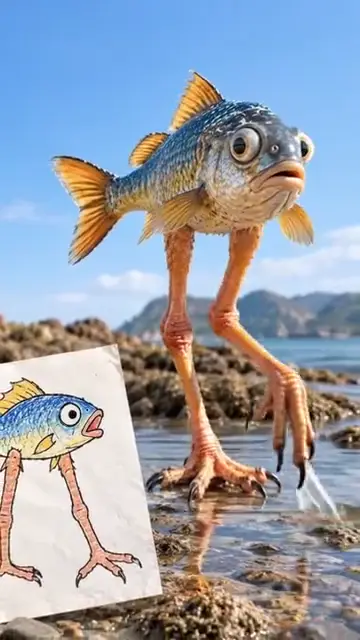
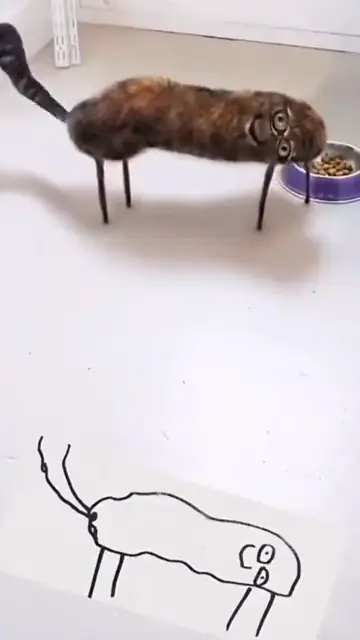
From TikTok, credited to the creators. Hover over a clip (or tap it) to play; tap a name to see the post.
Which drawings come to life best
- One main animal or thing per page, drawn big.
- Strong outlines and filled colors; light pencil loses detail.
- Creatures with legs, since they can walk toward the camera.
- A simple drawn setting, a sun, grass or a house, which becomes the real place.
- Odd shapes on purpose: the stranger the drawing, the funnier the real version.
What to do with a drawing to life video
- A birthday card: the drawing on the front, the drawing come to life inside, sent as a video message.
- A fridge gallery that moves: one drawing a week brought to life, kept in a folder to watch back at the end of the year.
- A gift for grandparents: the original drawing in the mail, the video on their phone the same day.
- Then and now: the same animal drawn at four and at eight, each drawing brought to life side by side.
- A bedtime story starring the creature from the drawing, with the video as the first page.
Share the drawing next to the video
- Show the drawing first, then the real version: the cut from paper to real is the moment people watch for.
- Film the drawing on the fridge or the table, or hold it up without showing the child’s face.
- Tag it, for example #drawingtolife, and add TikTok’s AI-generated content label. The rules are in does TikTok allow AI videos?.
- Ask the young artist first; it is their drawing.
Where the trend came from and what people make with it: the kids drawing to life trend.
FAQ
How do I bring my kid’s drawing to life?
Photograph the drawing flat in good light. To animate it as a cartoon, use an animation tool such as Meta’s Animated Drawings demo. To make it real, upload it to an AI effect like Drawing to Life on RapVideo.ai and download the video.
What kind of drawing works best?
One big animal or creature per drawing, with strong outlines and filled colors. A pale pencil drawing or a crowded page gives a weaker result.
Can I bring kids drawings to life for free?
Meta’s Animated Drawings demo animates drawn humanlike figures in their own flat style. Realistic AI videos that keep the drawing’s shape are paid on RapVideo.ai.
How do I turn a kid’s drawing into a real animal?
Use an AI drawing to life effect: it turns the drawing into a real photo with the same shape and colors, then animates it. On RapVideo.ai that is 5 seconds at 720p for 4 credits.
Do I need an app to bring kids drawings to life?
No. Both Meta’s demo and RapVideo.ai run in the browser on a phone or a computer.
Will the AI change my child’s drawing?
An AI realistic version changes the materials and the setting, not the shape: in our test a box-shaped lion stayed a box on stick legs. Results vary from drawing to drawing.
Sources
Read next
Kids Drawing to Life Trend: What It Is and Where It Started
The kids drawing to life trend: children’s drawings turned by AI into real animals and monsters that keep their wobbly shapes, the posts that made it go viral in October 2026, why it works, and how to make your own from one photo (5 seconds at 720p for 4 credits).
Does TikTok Allow AI Videos? Labels and Rules for 2026
TikTok allows AI videos but requires a label on realistic AI people and scenes: the label steps on phone and computer, what stays banned (private people without consent, misleading public figures), auto labels, and reach.
How to Make Funny AI Videos of Your Friends
How to make funny AI videos of your friends from two photos or one: rap duos, roast battles, hugs and one-photo trends, with ten ideas, the steps, what each costs on RapVideo and why to get a yes before posting.
RapVideo is an independent tool, not affiliated with Quavo, Takeoff, Migos, Quality Control Music, Motown or COLORS.