How to Make AI Videos Longer Than 10 or 15 Seconds
AI video models make short clips, usually 5 to 15 seconds each, because every extra second costs the provider more compute and the picture drifts the longer a model runs. A longer AI video is almost always several clips put together. There are four ways to do it: choose a model that renders a longer clip, extend a clip from its last second, chain clips by using the last frame of one as the first frame of the next, or make separate clips and join them in an editor.
Updated
Longer AI videos
Make AI videos longer
Several clips, one video.
- Longer model
- Extend
- Join clips
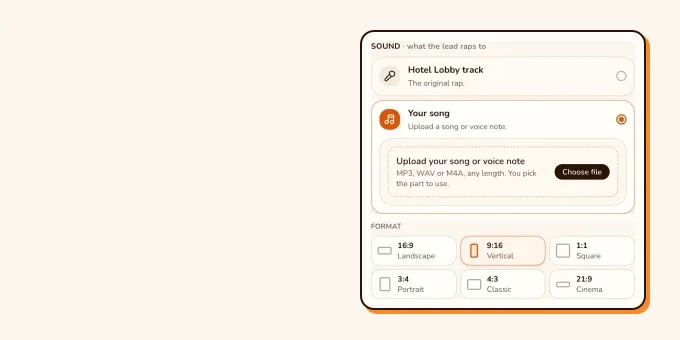
On RapVideo, a video that follows a track (the Hotel Lobby song, your own song, or an AI rap in the Hotel Lobby booth) runs 5, 8, 10, 12 or 15 seconds. An AI rap on another stage, or an effect, can run up to 30 seconds on Seedance 2.5. There is no extend button, so for anything longer you make several videos with the same photos and join them, as shown below.
Why AI videos are so short
- Cost: providers price video by the second, so longer clips cost more to make and to sell.
- Drift: faces, clothes and backgrounds change little by little over a long render. Short clips hide it.
- Sound: a model that makes its own audio also has to keep the voice and the beat steady, which gets harder with length.
The same limits apply to us. A track is at most 15 seconds, so any video that follows one (the Hotel Lobby song, your own song, or an AI rap in the Hotel Lobby booth, which follows that song’s beat) stops there. Only an AI rap on another stage, or an effect, goes to 20 or 30 seconds, and only on Seedance 2.5.
Longest booth video
Start with a 15-second clip
Add two photos, or one of you both. Make more with the same photos and join them for a longer video.
Your two performers
One person each. Left raps, right hypes.
Stage
Video & sound
First a free 2-second preview, one per account. The full 15-second video is 7 credits at 480p. View pricing
Four ways to get a longer AI video
| Way | How it works | Good for | Watch out for |
|---|---|---|---|
| A longer model | Pick a model or setting that renders more seconds in one go | One continuous shot, one take of a song | Costs more per clip; few models pass 15 to 30 seconds |
| Extend | The tool continues a finished clip from its last second | A scene that keeps moving | Only works in tools that offer it, on their own clips |
| Chain frames | Save the last frame, use it as the first frame of the next clip | Any image-to-video tool | Each link is a new render with its own sound; joins can jump |
| Join clips | Make several clips with the same photos, cut them together | Music videos, stories, a longer rap | Keep the same photos, outfit and shape so it looks like one video |
Google’s Flow is one tool with an Extend option: you pick a clip, choose Extend, describe what happens next and generate. Google says it only extends videos made with Veo, and its model page lists which Veo versions support it. These creators show the chaining idea: an end frame becomes the next start frame, and the same character is kept across clips.
- TikTokLonger AI videos with start and end frames@carter.braydon
- TikTokKeeping the same character from clip to clip@jo.thecreative
From TikTok, credited to the creators. Hover over a clip (or tap it) to play; tap a name to see the post.
Make a longer rap video from several clips
- Make the first video at the longest length, 15 seconds, in the 9:16 shape if it is for TikTok or Reels.
- Make the next ones with the same two photos, the same shape and the same quality. Change one thing per clip: the topic of the AI rap, the stage, or the part of your song.
- For your own song, cut it into parts of up to 15 seconds and use one part per video, in order. The editor takes MP3, WAV, M4A, AAC or OGG.
- Download the MP4s and line them up in CapCut, iMovie or any editor. Cut on a beat so the joins feel planned.
- Lay the full song over the top if each clip carries a piece of it, and check the lip sync at every join.
Each clip is a separate render, so faces and lighting can differ a little between them. Clear, front-facing photos keep them closer; see best photos for AI rap videos.
What a longer video costs on RapVideo
Each clip is priced on its own, so three clips cost three times one. On Wan 3.0 at 480p, the 5, 8, 10, 12 or 15-second lengths cost 3, 4, 5, 6 or 7 credits. RapVideo gives each new account one free 2-second watermarked preview of its default Hotel Lobby video or the Bulin 47 Freestyle. Prices for every model and quality are on the pricing page.
FAQ
Why are AI videos only a few seconds long?
Each second costs the provider compute, and faces and backgrounds drift over a long render. Most models stop at 5 to 15 seconds a clip.
How do I make an AI video longer than 10 seconds?
Use a model that renders longer clips, extend a clip in a tool that offers it, chain clips with the last frame as the next first frame, or join several clips in an editor.
How long can a RapVideo video be?
A video that follows a track, the Hotel Lobby song or your own, runs 5, 8, 10, 12 or 15 seconds. An AI rap on another stage, or an effect, can run up to 30 seconds on Seedance 2.5.
Can I make a full-length AI music video?
Yes, by joining clips. Cut your song into parts of up to 15 seconds, make one video per part with the same photos, and put them together in an editor.
Does RapVideo have an extend button?
No. Make another video with the same photos and settings and join the two in an editor.
Sources
Read next
How to Make an AI Music Video for Your Own Song
How to make an AI music video for your own song: the multi-tool workflow for a full-length video (song, scenes, lip sync, edit), or a 2 to 15-second performance clip of you and a friend on RapVideo with no extra credits for the audio.
How Long Does It Take to Make an AI Video? Our Times
Real render times from 126 paid RapVideo renders: about 3.7 minutes for a 12-second clip on Seedance 2.0 Mini, 7.8 minutes for 12 seconds on Wan 3.0 at 480p, and close to 20 minutes at 720p and 1080p, plus what makes a render slow.
RapVideo is an independent tool, not affiliated with Quavo, Takeoff, Migos, Quality Control Music, Motown or COLORS.