Hotel Lobby Trend With Your Dog or Cat: How to Do It
To do the Hotel Lobby trend with your dog or cat, add one clear photo of your pet and one of its partner, a second pet or you, and keep the Hotel Lobby stage selected. RapVideo puts the pair in the orange recording booth with a hanging mic, one on the left and one on the right, for 6 credits at 480p (12 seconds). RapVideo gives each new account one free 2-second watermarked preview of its default Hotel Lobby video or the Bulin 47 Freestyle.
Pets are the most common twist on the trend, and the results depend on the photo more than on the tool. Below are the steps, what one real test looked like, which photos to choose, and the limits we have not tested.
Updated
The steps, for a pet and a person
- Take one photo of your pet: face toward the camera, eyes open, in daylight, with the whole body in the frame if you can. One animal per photo.
- Add a second photo for the partner: another pet, or you. If you only have one picture with both of you in it, switch the editor to One photo and use that.
- Keep Hotel Lobby selected as the stage. The left photo takes the mic and the right photo is the hype partner.
- Check the price on the button, then create. A 12-second video at 480p takes about 5 to 15 minutes, and a failed render gives its credits back.
Shape: 16:9 is the default; pick 9:16 in Video settings for TikTok and Reels, and the price stays the same. To see how your pet looks first, make a 3-credit test (5 seconds at 480p) before you pay for a longer one at higher quality.
Free 2-second preview first
Add your pet and its partner
One photo of your pet, one of its partner, and the Hotel Lobby stage is already selected. The button shows the exact credits before you create.
Your two performers
One person each. Left raps, right hypes.
Stage
Video & sound
First a free 2-second preview, one per account. The full 12-second video is 6 credits at 480p. View pricing
What one real test gave
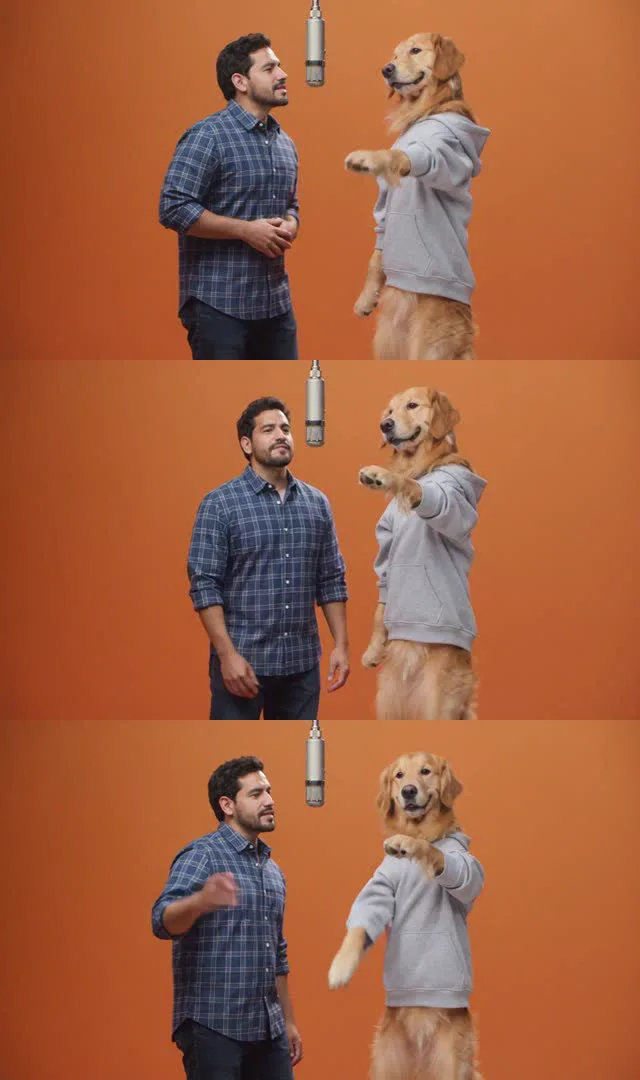
We tried it once on our own, with two AI-created photos: a man in a plaid shirt and a golden retriever in a gray hoodie, as a 2-second preview at 480p. The dog kept the hoodie from its photo, stood on its hind legs, raised a paw toward the man, and the man stayed in his plaid shirt. The orange wall and the hanging mic were in every frame.
That is one render of one dog, and it was a 2-second preview. It does not show how a full video looks, or how any other pet turns out. We have not tested cats, rabbits or birds, so we make no promise for them. If the first result looks off, the cheapest fix is a different photo of the same pet.
Which photos work for a pet
- A sharp photo with the face toward the camera. A pet turned away, or half hidden by a person or furniture, leaves the model to guess the face.
- Whatever your pet wears is copied along, like the hoodie in our test. A plain background and clear colors help, so the pet stands out from the scene.
- Fur color and markings carry over best when they are easy to see, so avoid backlit photos that turn a dark coat into a silhouette.
- The pet should be alone in its photo. A second animal or a person in the frame can show up in the video as an extra.
- Skip filtered photos and cartoon versions of your pet: the video starts from what the photo shows.
The general rules for people apply too, and they are in best photos for AI rap videos.
Who takes the mic
In the Hotel Lobby video the left photo raps and the right photo hypes. In our test the person was on the left and the dog on the right. If you want the pet in front, put its photo on the left. After a video is ready, the Hand the mic to the other one button remakes it with the two sides swapped; it uses credits like any new video.
| Pairing | How to set it up | Tested by us? |
|---|---|---|
| Dog and owner | One photo each, or one photo with both in it | Yes, once, with an AI-made man |
| Two dogs | One photo each, so each dog keeps its own look | No |
| Cat and dog, or two cats | One photo each | No |
Posting it
If the video looks realistic, label it as AI-generated when you post it on TikTok: TikTok asks creators to label realistic AI content, and its help page has the steps. Does TikTok allow AI videos? covers the rest. The MP4 has no watermark and carries the Hotel Lobby track; RapVideo is not connected to Quavo, Takeoff or their label.
FAQ
Can I do the Hotel Lobby trend with my dog?
Yes. Add a clear photo of the dog and one of its partner, a second pet or you, keep Hotel Lobby selected and create. A 12-second video at 480p is 6 credits.
Does it work with cats?
The steps are the same, but we have only tested a dog. Results vary by photo, so make a short 5-second test at 480p first.
Can I put my dog and myself in the same video?
Yes: one photo of the dog, one of you, or a single photo of you both. The left photo takes the mic and the right one is the hype partner.
How much does a Hotel Lobby video with a pet cost?
6 credits for 12 seconds at 480p, and 3 credits for a 5-second test at 480p. The smallest pack is 10 credits for $9.99. A failed render is refunded.
Is there a free preview?
The default Hotel Lobby video and the Bulin 47 Freestyle each come with a free 2-second preview: one per Google account, 480p, watermarked and on the site only. The full video, on Wan 3.0, is paid with credits.
Do I need to label the video on TikTok?
TikTok asks creators to label realistic AI-generated content. Turn on its AI-generated content label when you post.
Sources
Read next
Hotel Lobby Trend: How to Do It in Minutes From Two Photos
Three ways to do the Hotel Lobby trend (two photos and AI, a CapCut template, filming it yourself), with steps, free options and posting tips.
Hotel Lobby AI Doesn’t Look Like Me: Causes and Fixes
Why a Hotel Lobby AI video does not look like you, with the cause and the fix for the wrong face, wrong clothes, template costumes, a swapped side and a refused photo.
Best Photos for AI Rap Videos: What Works, What Fails
What makes a photo work or fail in the rap video generator, from the hard limits to light, angle, framing, sunglasses and group shots, with a fix for each.
Does TikTok Allow AI Videos? Labels and Rules for 2026
TikTok allows AI videos but requires a label on realistic AI people and scenes: the label steps on phone and computer, what stays banned (private people without consent, misleading public figures), auto labels, and reach.
RapVideo is an independent tool, not affiliated with Quavo, Takeoff, Migos, Quality Control Music, Motown or COLORS.